
207 lines
9.9 KiB
Markdown
207 lines
9.9 KiB
Markdown
---
|
|
|
|
slug: /configure-monitor
|
|
---
|
|
|
|
# Configure monitoring components
|
|
|
|
The performance monitoring and alerting features of obshell Dashboard depend on Prometheus and Alertmanager. This topic describes how to deploy the required monitoring components.
|
|
|
|
## Background
|
|
|
|
The performance monitoring feature of obshell Dashboard relies on obagent and Prometheus, while the alerting feature relies on Alertmanager. obagent provides an HTTP interface for data collection from seekdb. Prometheus periodically accesses obagent's interface to collect and persist monitoring data. obshell Dashboard displays the monitoring data collected by Prometheus. Alertmanager processes alerts from monitoring systems like Prometheus, offering features such as alert deduplication, grouping, routing, and muting.
|
|
|
|
## Install obagent
|
|
|
|
### Configure seekdb
|
|
|
|
1. Prepare a user
|
|
|
|
We recommend that you use a read-only user and grant the SELECT privilege on the oceanbase.* database to the user.
|
|
|
|
```shell
|
|
obclient> create user monitor identified by '******';
|
|
obclient> grant select on oceanbase.* to monitor;
|
|
```
|
|
|
|
2. Set the instance name
|
|
|
|
If you want to monitor multiple seekdb instances by using Prometheus, you must set different instance names for these instances. This way, you can better distinguish these instances.
|
|
|
|
```shell
|
|
obclient> alter system set `cluster` = 'obcluster';
|
|
```
|
|
|
|
:::tip
|
|
To set the instance name, you must add backticks (<code>`</code>) to the <code>cluster</code> parameter.
|
|
:::
|
|
|
|
### Configure obagent
|
|
|
|
1. Install obagent
|
|
|
|
Go to the [Open Source Image Library](https://mirrors.aliyun.com/oceanbase/community/stable/) and download the obagent installation package corresponding to the architecture of your environment. Then, run the following command to install obagent. We recommend that you install the latest version.
|
|
|
|
```shell
|
|
[root@test ~]# rpm -ivh obagent-*.rpm
|
|
```
|
|
|
|
By default, obagent is installed in the `/home/admin` directory.
|
|
|
|
2. Configure obagent
|
|
|
|
Run the following command to configure the account password for data collection and some necessary metadata information.
|
|
|
|
```shell
|
|
[root@test ~]# cd /home/admin/obagent
|
|
[root@test obagent]# bin/ob_agentctl config --update monagent.ob.monitor.user=monitor,monagent.ob.monitor.password=******,monagent.ob.cluster.name=obcluster,monagent.pipeline.ob.status=active,agent.http.basic.auth.metricAuthEnabled=false
|
|
```
|
|
|
|
The following table describes the command parameters.
|
|
|
|
* `monagent.ob.monitor.user`: specifies the account for data collection. The value is the read-only user created in seekdb. In this example, the value is `monitor`.
|
|
* `monagent.ob.monitor.password`: specifies the password for the account for data collection. The value is the password of the read-only user in seekdb.
|
|
* `monagent.ob.cluster.name`: specifies the instance name of the seekdb instance. After you connect to the instance, you can run the `SHOW PARAMETERS LIKE 'cluster';` command to query the instance name. The value in the `value` column is the instance name.
|
|
* `monagent.pipeline.ob.status`: specifies whether to collect metrics of seekdb. Set the value to `active` to enable the collection of metrics of seekdb.
|
|
* `agent.http.basic.auth.metricAuthEnabled`: specifies whether to enable basic authentication for the HTTP interface of obagent. Set the value to `false` to disable basic authentication for the HTTP interface of obagent.
|
|
|
|
The command output is as follows:
|
|
|
|
```shell
|
|
{"successful":true,"message":"success","error":""}
|
|
```
|
|
|
|
3. Start obagent
|
|
|
|
```shell
|
|
[root@test obagent]# bin/ob_agentctl start
|
|
```
|
|
|
|
The command output is as follows:
|
|
|
|
```shell
|
|
{"successful":true,"message":"ok","error":""}
|
|
```
|
|
|
|
### Verification
|
|
|
|
You can check whether obagent is started by viewing the process, or you can access the data query interface to verify whether you can obtain monitoring data.
|
|
|
|
* View the process.
|
|
|
|
```shell
|
|
[root@test obagent]# ps -ef | grep agent
|
|
```
|
|
|
|
The output is as follows:
|
|
|
|
```shell
|
|
root 27064 1 0 14:46 ? 00:00:00 /home/admin/obagent/bin/ob_agentd -c /home/admin/obagent/conf/agentd.yaml
|
|
root 27071 27064 0 14:46 ? 00:00:00 /home/admin/obagent/bin/ob_mgragent
|
|
root 27072 27064 0 14:46 ? 00:00:00 /home/admin/obagent/bin/ob_monagent
|
|
root 27116 26122 0 14:47 pts/0 00:00:00 grep --color=auto agent
|
|
```
|
|
|
|
* Access the data query interface.
|
|
|
|
```shell
|
|
[root@test obagent]# curl -L 'http://127.0.0.1:8088/metrics/ob/basic'
|
|
```
|
|
|
|
The output is as follows:
|
|
|
|
```shell
|
|
# HELP ob_active_session_num monitor collected message
|
|
# TYPE ob_active_session_num untyped
|
|
ob_active_session_num{app="OB",ob_cluster_id="0",ob_cluster_name="obcluster",ob_tenant_id="1",obzone="",svr_ip="127.0.0.1",svr_port="2882",tenant_name="sys"} 0 1762135926015
|
|
# HELP ob_all_session_num monitor collected message
|
|
# TYPE ob_all_session_num untyped
|
|
ob_all_session_num{app="OB",ob_cluster_id="0",ob_cluster_name="obcluster",ob_tenant_id="1",obzone="",svr_ip="127.0.0.1",svr_port="2882",tenant_name="sys"} 0 1762135926015
|
|
# HELP ob_plan_cache_access_total monitor collected message
|
|
# TYPE ob_plan_cache_access_total untyped
|
|
ob_plan_cache_access_total{app="OB",ob_cluster_id="0",ob_cluster_name="obcluster",ob_tenant_id="1",obzone="",svr_ip="127.0.0.1",svr_port="2882",tenant_name="sys"} 33229 1762135926015
|
|
# HELP ob_plan_cache_hit_total monitor collected message
|
|
# TYPE ob_plan_cache_hit_total untyped
|
|
ob_plan_cache_hit_total{app="OB",ob_cluster_id="0",ob_cluster_name="obcluster",ob_tenant_id="1",obzone="",svr_ip="127.0.0.1",svr_port="2882",tenant_name="sys"} 32051 1762135926015
|
|
# HELP ob_plan_cache_memory_bytes monitor collected message
|
|
# TYPE ob_plan_cache_memory_bytes untyped
|
|
ob_plan_cache_memory_bytes{app="OB",ob_cluster_id="0",ob_cluster_name="obcluster",ob_tenant_id="1",obzone="",svr_ip="127.0.0.1",svr_port="2882",tenant_name="sys"} 1.15905078e+08 1762135926015
|
|
# HELP ob_server_num monitor collected message
|
|
# TYPE ob_server_num untyped
|
|
ob_server_num{app="OB",ob_cluster_id="0",ob_cluster_name="obcluster",obzone="",server_ips="127.0.0.1",status="ACTIVE",svr_ip="127.0.0.1",svr_port="2882"} 1 1762135926015
|
|
# HELP ob_sysstat monitor collected message
|
|
# TYPE ob_sysstat untyped
|
|
ob_sysstat{app="OB",ob_cluster_id="0",ob_cluster_name="obcluster",ob_tenant_id="1",obzone="",stat_id="10000",svr_ip="127.0.0.1",svr_port="2882",tenant_name="sys"} 2673 1762135926015
|
|
ob_sysstat{app="OB",ob_cluster_id="0",ob_cluster_name="obcluster",ob_tenant_id="1",obzone="",stat_id="10001",svr_ip="127.0.0.1",svr_port="2882",tenant_name="sys"} 2.838626e+06 1762135926015
|
|
······# Subsequent outputs are omitted
|
|
```
|
|
|
|
## Configure Prometheus
|
|
|
|
For more information, visit the [Prometheus website](https://prometheus.io/) or [open source mirror](https://mirrors.aliyun.com/oceanbase/community/stable/). You can download and deploy the corresponding installation package of Prometheus based on the architecture of the environment in which you want to deploy Prometheus. Generally, one Prometheus instance is sufficient to monitor all seekdb instances. This section provides only a sample configuration. For more information, see [Prometheus documentation](https://prometheus.io/docs/prometheus/latest/getting_started/).
|
|
|
|
:::info
|
|
|
|
For more information about the Prometheus alerting rules provided by OceanBase, see the <a href="https://github.com/oceanbase/obdeploy/blob/master/plugins/prometheus/2.37.1/prometheus_rules.yaml">GitHub repository</a>.
|
|
:::
|
|
|
|
```shell
|
|
global:
|
|
scrape_interval: 5s # Set the scrape interval to every 15 seconds. Default is every 1 minute.
|
|
evaluation_interval: 5s # Evaluate rules every 15 seconds. The default is every 1 minute.
|
|
|
|
# Alertmanager configuration, prometheus will push alerts to these addresses
|
|
alerting:
|
|
alertmanagers:
|
|
- static_configs:
|
|
- targets:
|
|
- localhost:9093
|
|
|
|
# Load rules once and periodically evaluate them according to the global 'evaluation_interval'.
|
|
rule_files:
|
|
- "prometheus_rules.yaml"
|
|
# - "second_rules.yml"
|
|
|
|
scrape_configs:
|
|
- job_name: "ob-basic"
|
|
metrics_path: "/metrics/ob/basic"
|
|
# Open the following configurations for Prometheus 3.x.
|
|
|
|
|
|
# fallback_scrape_protocol: PrometheusText0.0.4
|
|
static_configs:
|
|
- targets: ["127.0.0.1:8088"]
|
|
- job_name: "ob-extra"
|
|
metrics_path: "/metrics/ob/extra"
|
|
# prometheus 3.x needs to enable the following configuration.
|
|
# fallback_scrape_protocol: PrometheusText0.0.4
|
|
static_configs:
|
|
- targets: ["127.0.0.1:8088"]
|
|
- job_name: "ob-host"
|
|
metrics_path: "/metrics/node/host"
|
|
# Enable the following configuration for Prometheus 3.x:
|
|
|
|
|
|
# fallback_scrape_protocol: PrometheusText0.0.4
|
|
static_configs:
|
|
- targets: ["127.0.0.1:8088"]
|
|
```
|
|
|
|
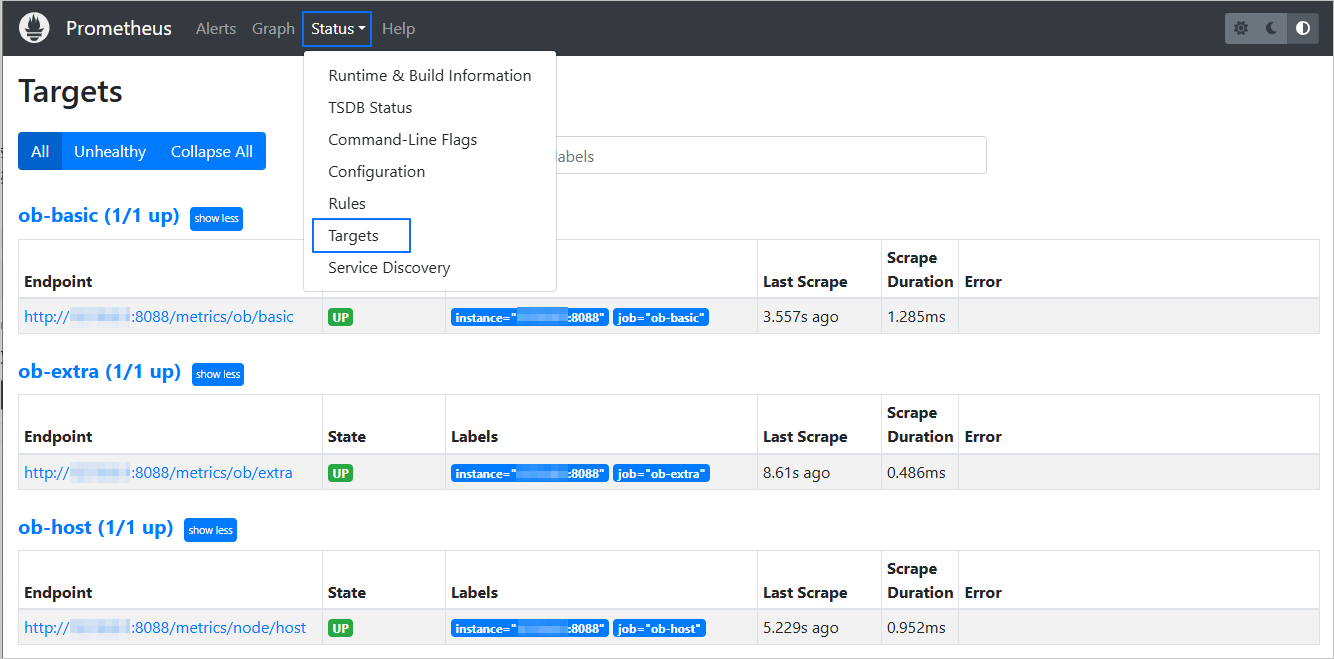
After you configure Prometheus, you can access the Prometheus graphical interface, click **Status** in the left navigation pane, and select **Target** to check whether data is collected.
|
|
|
|
:::info
|
|
|
|
Different versions of Prometheus may have different interface terms. Therefore, <b>Target</b> is provided as an example only in this case.
|
|
:::
|
|
|
|
|
|
|
|
### Configure Alertmanager
|
|
|
|
Go to [Prometheus](https://prometheus.io/) or [Open Source Mirror](https://mirrors.aliyun.com/oceanbase/community/stable/) and download and decompress the required installation package based on the architecture of your environment. Modify the configuration file (`alertmanager.yml`) as described in the [Alertmanager documentation](https://prometheus.io/docs/alerting/latest/configuration/). Then, go to the working directory and run the following command to start Alertmanager:
|
|
|
|
```shell
|
|
[root@test alertmanager]# nohup ./alertmanager --config.file=alertmanager.yml --cluster.advertise-address=127.0.0.1:9093 > alertmanager.log 2>&1 &
|
|
```
|
|
|
|
In the example, `127.0.0.1:9093` indicates the service address, and `nohup` indicates that the alertmanager process is run in the background. |