
282 lines
11 KiB
Markdown
282 lines
11 KiB
Markdown
---
|
|
|
|
slug: /build-multi-model-application-based-on-oceanbase
|
|
---
|
|
|
|
# Build a cultural tourism assistant with seekdb multi-model integration
|
|
|
|
This topic demonstrates how to build your cultural tourism assistant using seedb's multi-model integration technology.
|
|
|
|
In this example, we build an attraction recommendation application through seekdb's multi-model integration of spatial data and vector search. This application can use hybrid search of GIS and vector data to find related attractions, combined with a large language model (LLM) Agent workflow to implement a simple travel planning assistant.
|
|
|
|
## How it works
|
|
|
|
* **Spatial data processing technology**: GIS systems provide precise geographic positioning and optimal route planning.
|
|
|
|
* **Vector data processing technology**: Uses a pre-trained model (BGE-m3) to convert unstructured data of attractions into vector representations, and leverages seedb's vector search capabilities to efficiently process similarity searches.
|
|
|
|
* **Large language model Agent technology**: At the intelligent interaction level, uses LLM Agent technology combined with Prompt Engineering to understand user intent and enable multi-turn conversations, achieving task decomposition and planning. This enhances the system's interactive experience, accurately understanding your needs and providing personalized services.
|
|
|
|
* **Content-based recommendation algorithm**: Combines collaborative filtering and content-based recommendation algorithms, incorporating contextual information such as season and ratings to achieve personalized recommendations.
|
|
|
|
## Concepts
|
|
|
|
:::collapse
|
|
|
|
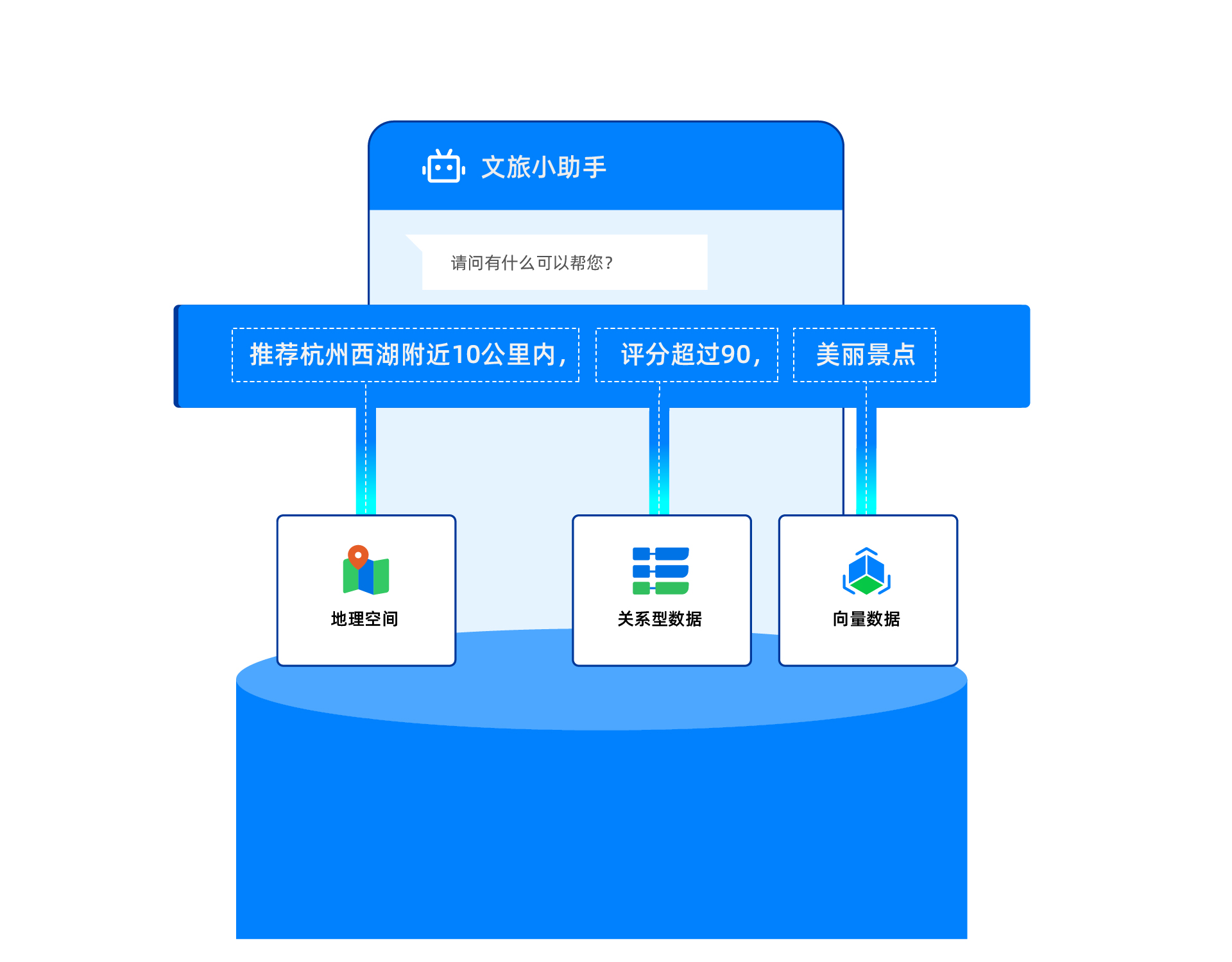
* **Multi-model integration**: Multi-model integration is an important capability of seekdb. In this topic, multi-model integration mainly refers to multi-model data hybrid search technology. seekdb supports integrated queries across vector data, spatial data, document data, and scalar data. With support for various indexes—including vector indexes, spatial indexes, and full-text indexes—it provides high-performance hybrid search capabilities.
|
|
|
|
<!--  -->
|
|
|
|
* **Large Language Model (LLM)**: A large language model is a deep learning model trained on vast amounts of text data. It can generate natural language text or understand the meaning of language text. Large language models can handle various natural language tasks, such as text classification, question answering, and conversation, making them an important pathway toward artificial intelligence.
|
|
|
|
:::
|
|
|
|
## Prerequisites
|
|
|
|
* You have deployed seekdb. For more information about deploying seekdb, see [Deployment overview](../../400.guides/400.deploy/50.deploy-overview.md).
|
|
|
|
* You have created a database. For more information about creating a database, see [Create a database](https://en.oceanbase.com/docs/common-oceanbase-database-10000000001971662).
|
|
|
|
* Vector search is enabled. For more information about vector search, see [Perform vector search by using SQL statements](https://www.oceanbase.com/docs/common-oceanbase-database-cn-1000000002012934).
|
|
|
|
```shell
|
|
obclient> ALTER SYSTEM SET ob_vector_memory_limit_percentage = 30;
|
|
```
|
|
|
|
* (Recommended, not required) Install [Python 3.10 and later](https://www.python.org/downloads/) and the corresponding [pip](https://pip.pypa.io/en/stable/installation/). If your machine has a low Python version, you can use Miniconda to create a new Python 3.10 or later environment. For more information, see [Miniconda installation guide](https://docs.anaconda.com/miniconda/install/).
|
|
|
|
```shell
|
|
conda create -n obmms python=3.10 && conda activate obmms
|
|
```
|
|
|
|
* Install [Poetry](https://python-poetry.org/docs/). You can refer to the following command:
|
|
|
|
```shell
|
|
python3 -m ensurepip
|
|
python3 -m pip install poetry
|
|
```
|
|
|
|
* Install the required Python packages. You can refer to the following command:
|
|
|
|
```shell
|
|
pip install python-dotenv tqdm streamlit pyobvector==0.2.16
|
|
```
|
|
|
|
## Step 1: Obtain the LLM API key
|
|
|
|
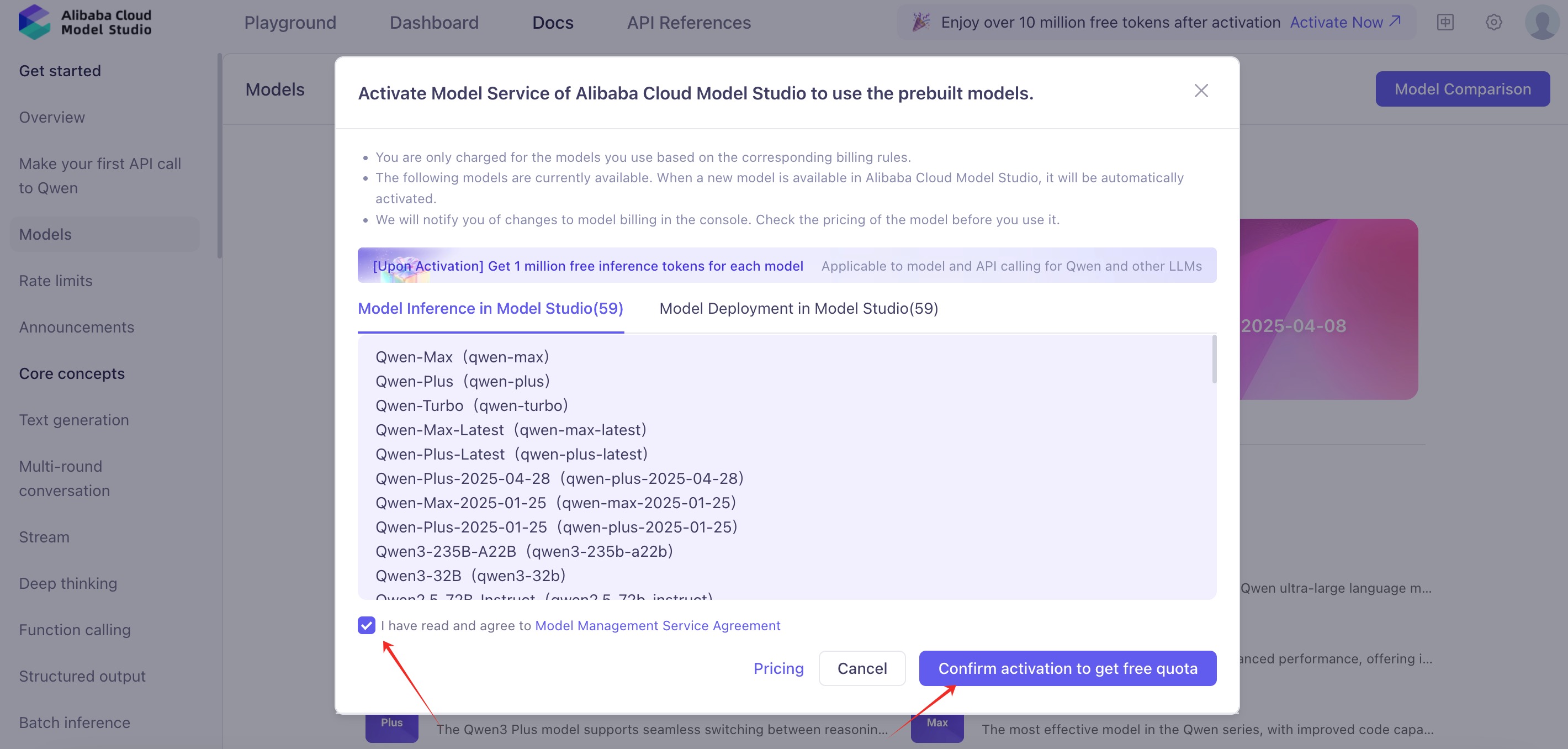
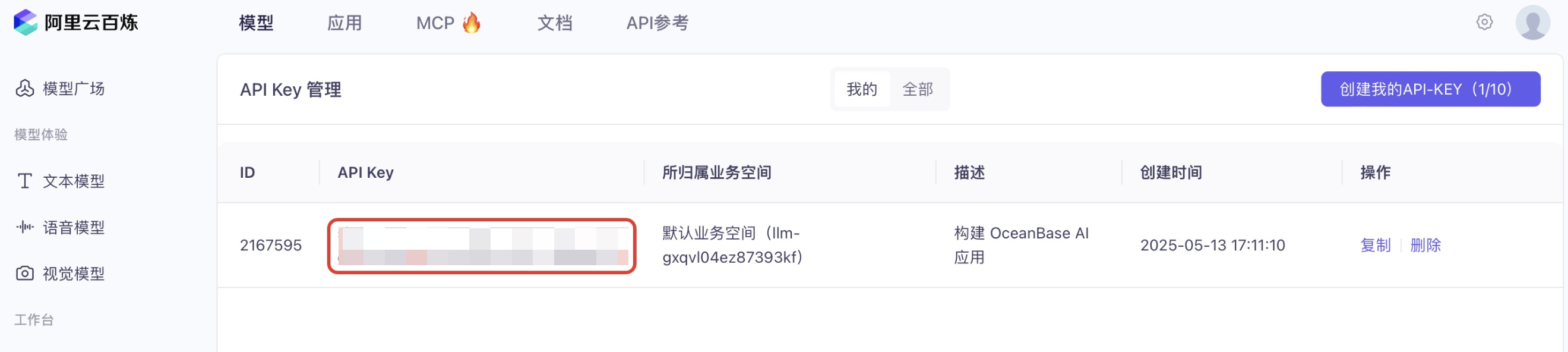
1. Register for an account with [Alibaba Cloud Model Studio](https://bailian.console.alibabacloud.com/), activate the model service, and obtain an API key.
|
|
|
|

|
|
|
|
|
|
|
|

|
|
|
|
<!--  -->
|
|
|
|
## Step 2: Obtain a geographic service API key
|
|
|
|
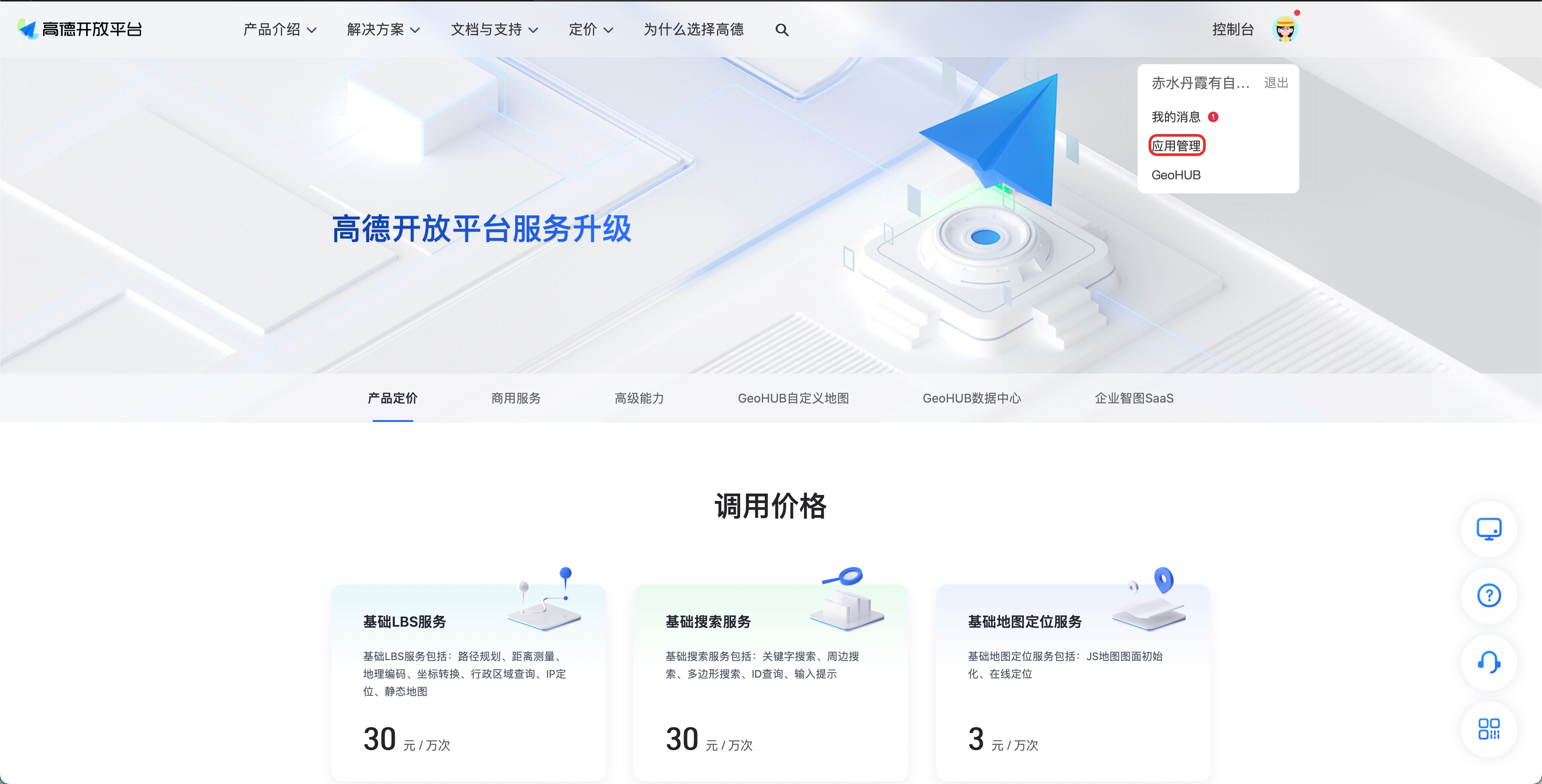
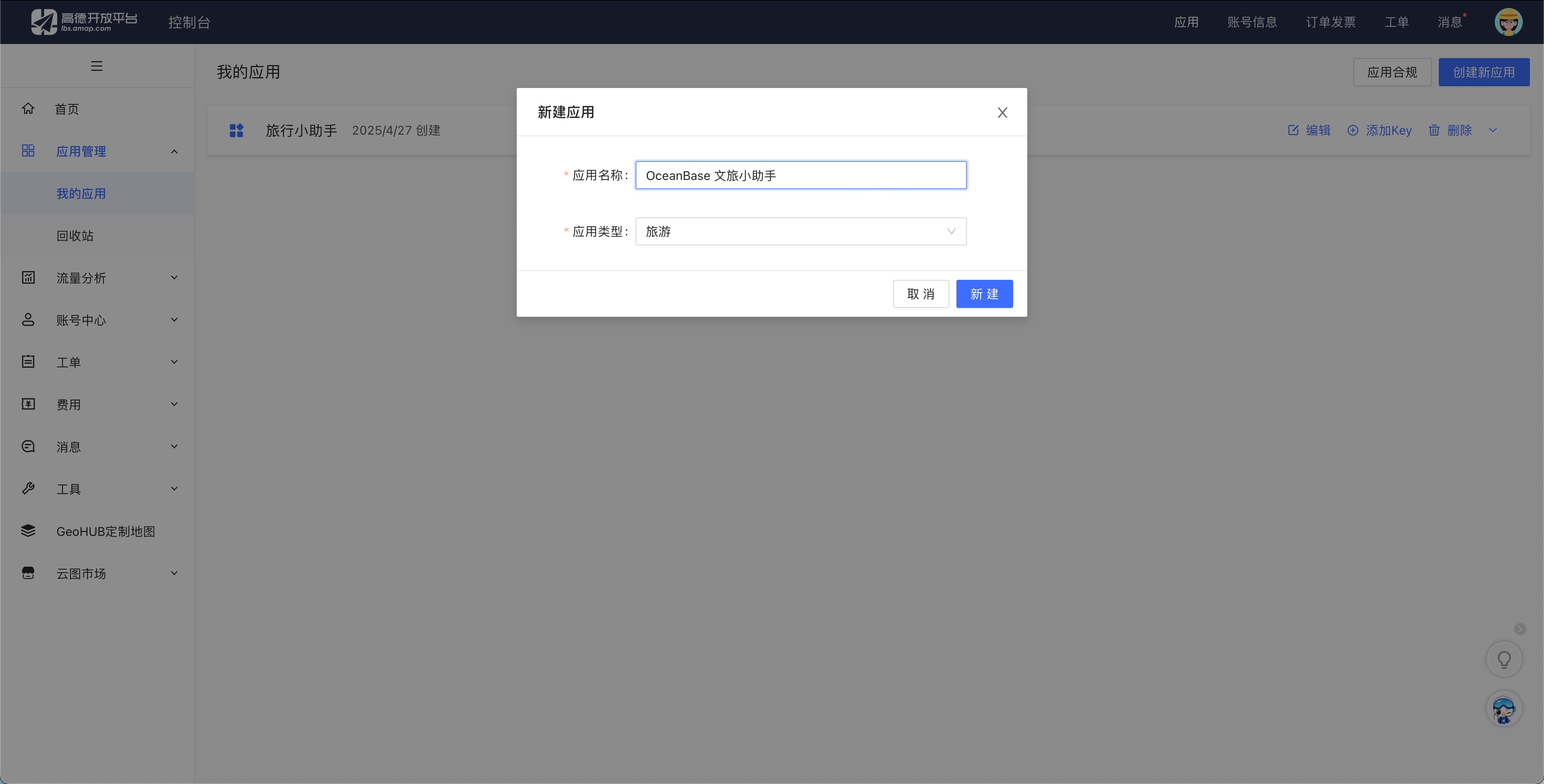
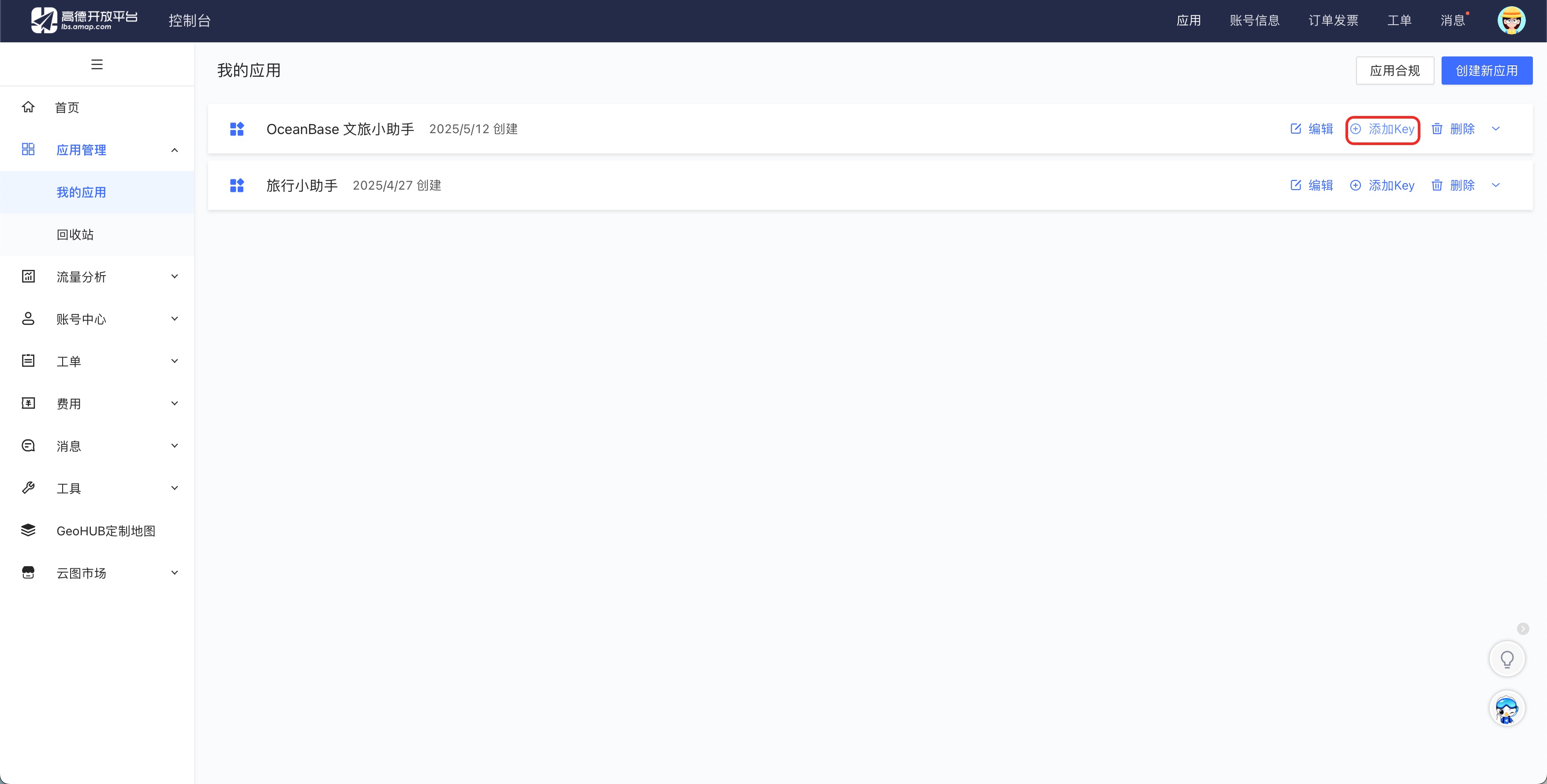
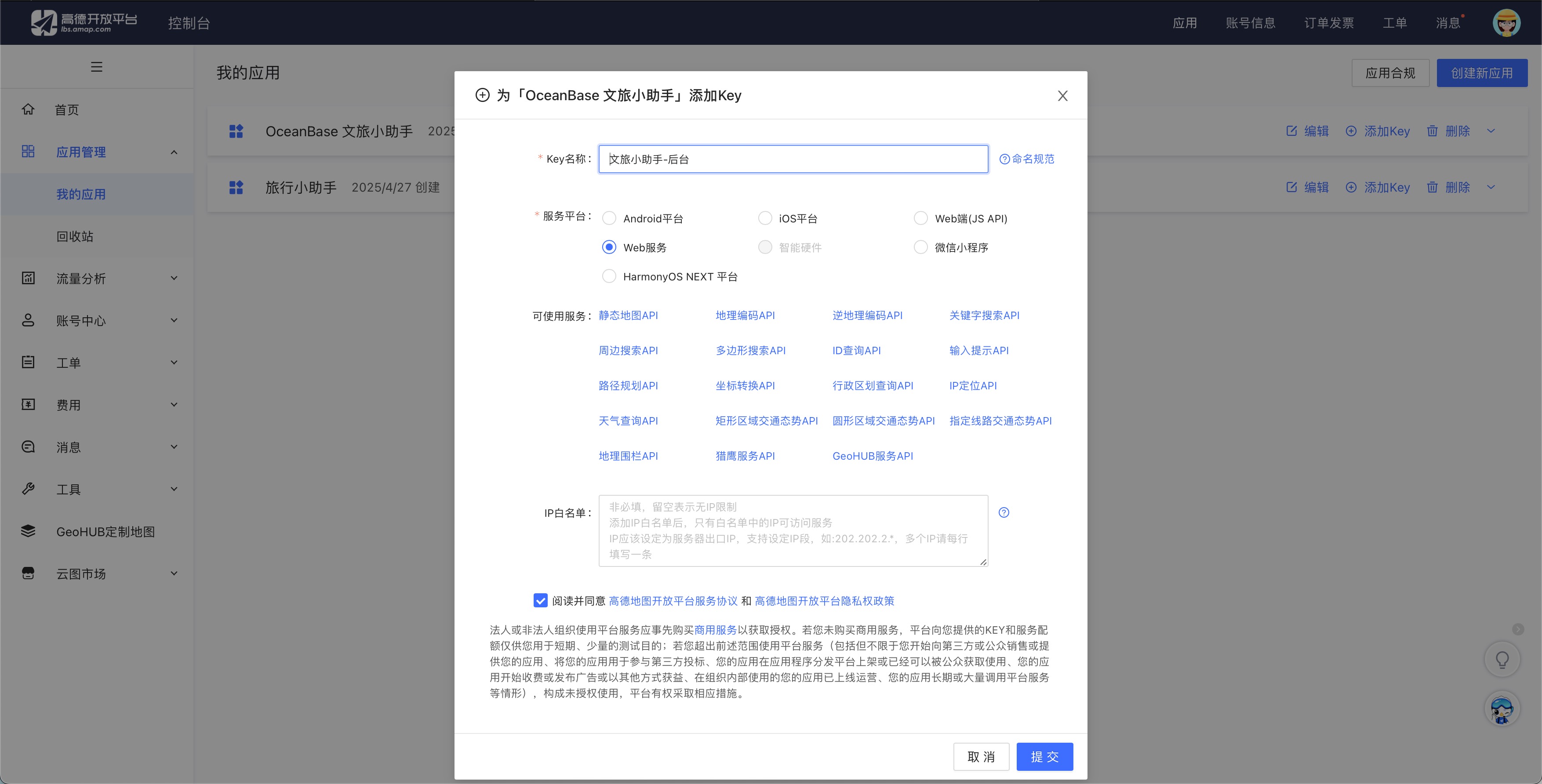
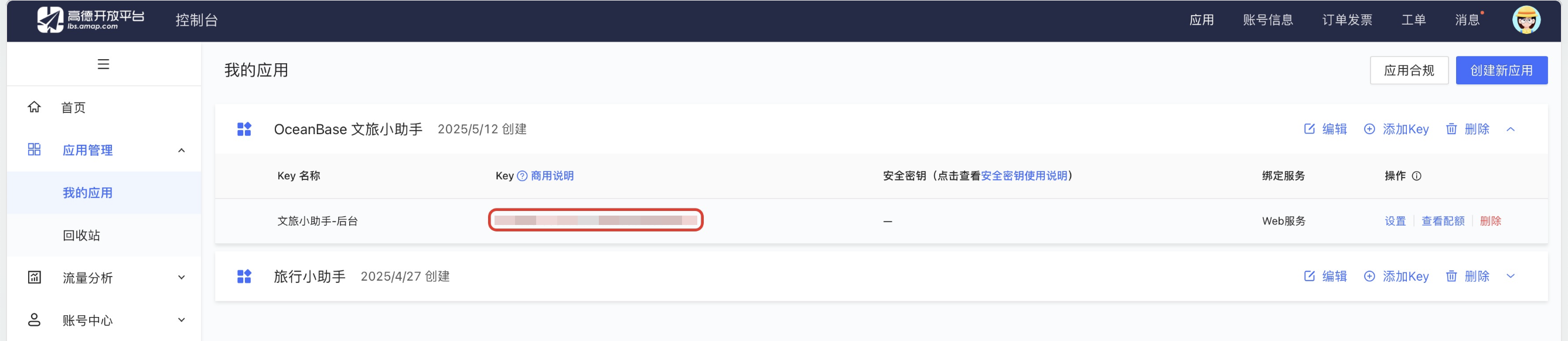
Register on the Amap (Gaode) Open Platform and obtain an API key for the [Basic LBS service](https://obbusiness-private.oss-cn-shanghai.aliyuncs.com/doc/img/cloud/tutorial/%E9%AB%98%E5%BE%B72.jpg).
|
|
|
|
<!-- 
|
|
|
|

|
|
|
|
|
|
|
|
|
|
|
|
|
|
|
|
 -->
|
|
|
|
## Step 3: Download the public dataset
|
|
|
|
Download the [China City Attraction Details](https://www.kaggle.com/datasets/audreyhengruizhang/china-city-attraction-details) dataset from Kaggle.
|
|
|
|
## Step 4: Build your cultural tourism assistant
|
|
|
|
### Clone the project repository
|
|
|
|
1. Clone the latest project repository.
|
|
|
|
```shell
|
|
git clone https://github.com/oceanbase-devhub/ob-multi-model-search-demo.git
|
|
cd ob-multi-model-search-demo
|
|
```
|
|
|
|
2. Move the downloaded `archive` dataset ZIP package to the `ob-multi-model-search-demo` project folder, rename it to `citydata`, and decompress it.
|
|
|
|
```shell
|
|
# Please modify the path to the actual location of archive.zip.
|
|
mv ./archive.zip ./citydata.zip
|
|
unzip ./citydata.zip
|
|
```
|
|
|
|
### Install dependencies
|
|
|
|
Run the following command in the project root directory to install dependencies.
|
|
|
|
```shell
|
|
poetry install
|
|
```
|
|
|
|
### Set environment variables
|
|
|
|
Set the environment variables in the `.env` file:
|
|
|
|
```shell
|
|
vim .env
|
|
```
|
|
|
|
You need to update the `OB_`-prefixed variables with your database connection information, and manually add the following variables: update `DASHSCOPE_API_KEY` with the API key obtained from the Alibaba Cloud Tongyi Lab console, and update `AMAP_API_KEY` with the API key obtained from the Alibaba Cloud AMap API service. Then, save the file.
|
|
|
|
```text
|
|
# Host address in the database connection string
|
|
OB_URL="******" ## Format: IP:<port>
|
|
OB_USER="******" ## Username
|
|
OB_DB_NAME="******" ## Database name
|
|
# Password in the database connection string
|
|
OB_PWD="******"
|
|
# Optional SSL CA file path in the database connection string. If you do not need SSL encryption, remove this parameter.
|
|
OB_DB_SSL_CA_PATH="******"
|
|
|
|
# Manually add LLM API key
|
|
DASHSCOPE_API_KEY="******"
|
|
# Manually add Amap API key
|
|
AMAP_API_KEY="******"
|
|
```
|
|
|
|
### Import data
|
|
|
|
In this step, we will import the data from the downloaded dataset into seekdb.
|
|
|
|
:::tip
|
|
For the first build, we recommend that you select only a portion of the data (such as attractions starting with the letter A) for import. Importing all data will take a long time.
|
|
:::
|
|
|
|
```shell
|
|
python ./obmms/data/attraction_data_preprocessor.py
|
|
```
|
|
|
|
If the following progress is displayed, the data is being successfully imported.
|
|
|
|
```text
|
|
...
|
|
./citydata/Changde.csv:
|
|
100%|███████████████████████████████████████████████████████████████████████████| 100/100 [00:04<00:00, 20.77it/s]
|
|
./citydata/Weinan.csv:
|
|
100%|█████████████████████████████████████████████████████████████████████████████| 90/90 [00:13<00:00, 6.54it/s]
|
|
...
|
|
```
|
|
|
|
### Start the UI chat interface
|
|
|
|
Run the following command to start the chat interface:
|
|
|
|
```bash
|
|
poetry run streamlit run ./ui.py
|
|
```
|
|
|
|
If no web page is directly displayed, you can visit the URL shown in the terminal to open the tourism assistant application.
|
|
|
|
```bash
|
|
You can now view your Streamlit app in your browser.
|
|
|
|
Local URL: http://localhost:8501
|
|
Network URL: http://172.xxx.xxx.xxx:8501
|
|
External URL: http://172.xxx.xxx.xxx:8501
|
|
```
|
|
|
|
<!-- ## Application display
|
|
|
|
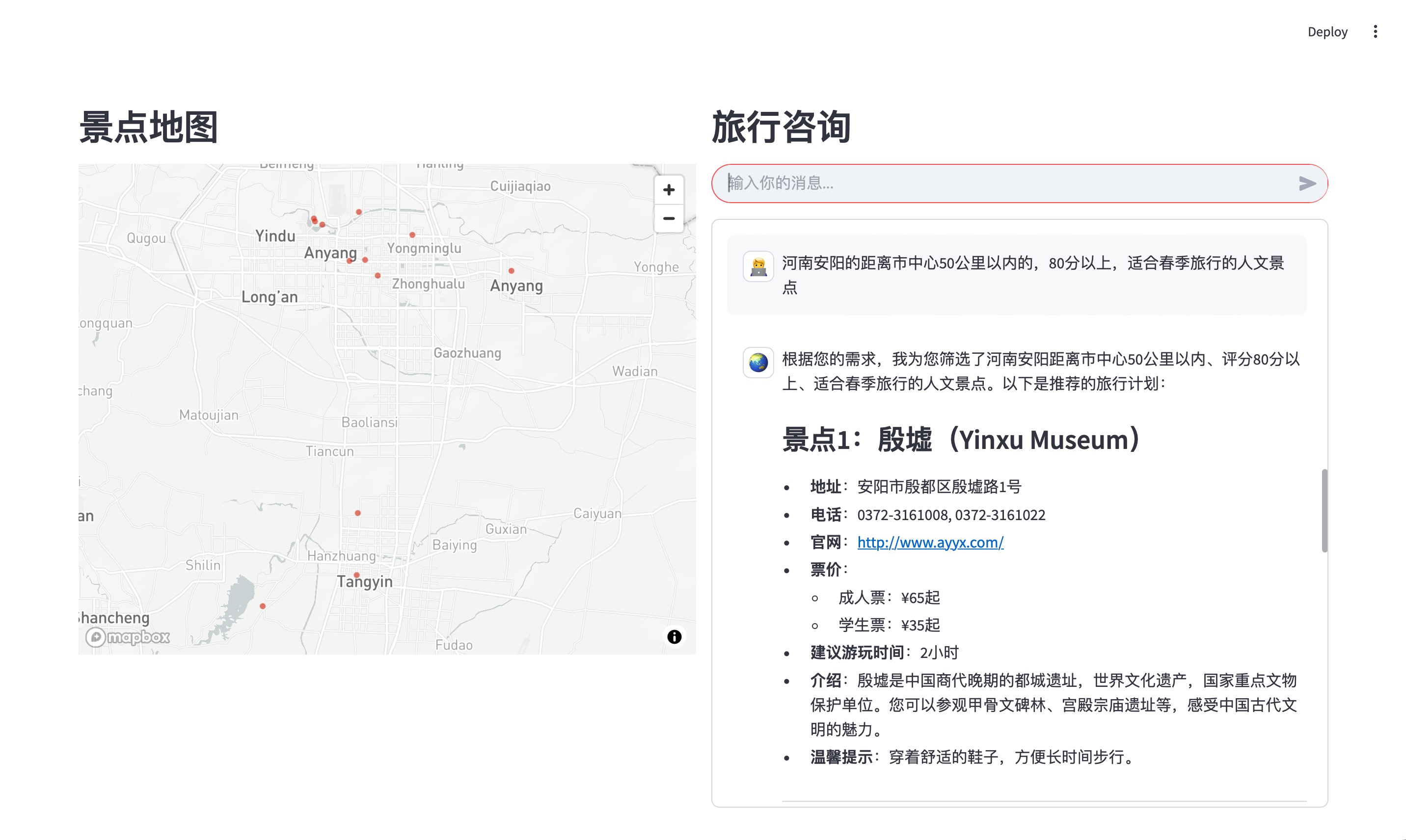-->
|
|
|
|
## Troubleshooting
|
|
|
|
### Dependency installation issues
|
|
|
|
#### Poetry installation failure
|
|
|
|
If the `poetry install` command fails, try the following steps:
|
|
|
|
1. Update Poetry to the latest version:
|
|
```shell
|
|
pip install --upgrade poetry
|
|
```
|
|
|
|
2. Clear the Poetry cache:
|
|
```shell
|
|
poetry cache clear --all pypi
|
|
```
|
|
|
|
3. Reinstall dependencies:
|
|
```shell
|
|
poetry install --no-cache
|
|
```
|
|
|
|
### Environment configuration issues
|
|
|
|
#### Python environment not activated
|
|
|
|
:::tip
|
|
Make sure you have activated the correct Python environment (such as the obmms conda environment) before installing dependencies.
|
|
:::
|
|
|
|
Make sure you have activated the correct conda environment:
|
|
|
|
```shell
|
|
conda activate obmms
|
|
```
|
|
|
|
#### Python version incompatibility
|
|
|
|
Make sure you are using Python 3.10 or later:
|
|
|
|
```shell
|
|
python --version
|
|
```
|
|
|
|
If the version is too low, recreate the environment:
|
|
|
|
```shell
|
|
conda create -n obmms python=3.10
|
|
conda activate obmms
|
|
```
|
|
|
|
### Database connection issues
|
|
|
|
If you encounter database connection issues, check:
|
|
|
|
1. Whether the database connection information in the `.env` file is correct
|
|
2. Whether seekdb is running normally
|
|
3. Whether the network connection is normal
|
|
4. Whether the database user has sufficient privileges
|
|
|
|
### Other common issues
|
|
|
|
#### Port occupied
|
|
|
|
If Streamlit prompts that the port is occupied when starting, you can specify another port:
|
|
|
|
```shell
|
|
poetry run streamlit run ./ui.py --server.port 8502
|
|
```
|
|
|
|
#### Insufficient memory
|
|
|
|
If you encounter memory issues during data import, you can:
|
|
|
|
1. Reduce the batch import data volume
|
|
2. Increase system memory
|
|
3. Adjust seekdb memory configuration
|
|
|
|
#### API key issues
|
|
|
|
Make sure you have correctly configured:
|
|
|
|
1. Alibaba Cloud Bailian API key (DASHSCOPE_API_KEY)
|
|
2. Amap API key (AMAP_API_KEY)
|
|
|
|
API keys can be configured in the `.env` file.
|