
12 KiB
How Skills work
Skills leverage Claude's VM environment to provide capabilities beyond what's possible with prompts alone. Claude operates in a virtual machine with filesystem access, allowing Skills to exist as directories containing instructions, executable code, and reference materials, organized like an onboarding guide you'd create for a new team member.
This filesystem-based architecture enables progressive disclosure: Claude loads information in stages as needed, rather than consuming context upfront.
Three types of Skill content, three levels of loading
Skills can contain three types of content, each loaded at different times:
Level 1: Metadata (always loaded)
Content type: Instructions. The Skill's YAML frontmatter provides discovery information:
---
name: pdf-processing
description: Extract text and tables from PDF files, fill forms, merge documents. Use when working with PDF files or when the user mentions PDFs, forms, or document extraction.
---
Claude loads this metadata at startup and includes it in the system prompt. This lightweight approach means you can install many Skills without context penalty; Claude only knows each Skill exists and when to use it.
Level 2: Instructions (loaded when triggered)
Content type: Instructions. The main body of SKILL.md contains procedural knowledge: workflows, best practices, and guidance:
# PDF Processing

## Quick start

Use pdfplumber to extract text from PDFs:

```python
import pdfplumber

with pdfplumber.open("document.pdf") as pdf:
    text = pdf.pages[0].extract_text()
```

For advanced form filling, see [FORMS.md](FORMS.md).
When you request something that matches a Skill's description, Claude reads SKILL.md from the filesystem via bash. Only then does this content enter the context window.
Level 3: Resources and code (loaded as needed)
Content types: Instructions, code, and resources. Skills can bundle additional materials:
pdf-skill/
├── SKILL.md (main instructions)
├── FORMS.md (form-filling guide)
├── REFERENCE.md (detailed API reference)
└── scripts/
    └── fill_form.py (utility script)
Instructions: Additional markdown files (FORMS.md, REFERENCE.md) containing specialized guidance and workflows
Code: Executable scripts (fill_form.py, validate.py) that Claude runs via bash; scripts provide deterministic operations without consuming context
Resources: Reference materials like database schemas, API documentation, templates, or examples
Claude accesses these files only when referenced. The filesystem model means each content type has different strengths: instructions for flexible guidance, code for reliability, resources for factual lookup.
| Level | When Loaded | Token Cost | Content |
|---|---|---|---|
| Level 1: Metadata | Always (at startup) | ~100 tokens per Skill | name and description from YAML frontmatter |
| Level 2: Instructions | When Skill is triggered | Under 5k tokens | SKILL.md body with instructions and guidance |
| Level 3+: Resources | As needed | Effectively unlimited | Bundled files executed via bash without loading contents into context |
Progressive disclosure ensures only relevant content occupies the context window at any given time.
The Skills architecture
Skills run in a code execution environment where Claude has filesystem access, bash commands, and code execution capabilities. Think of it like this: Skills exist as directories on a virtual machine, and Claude interacts with them using the same bash commands you'd use to navigate files on your computer.
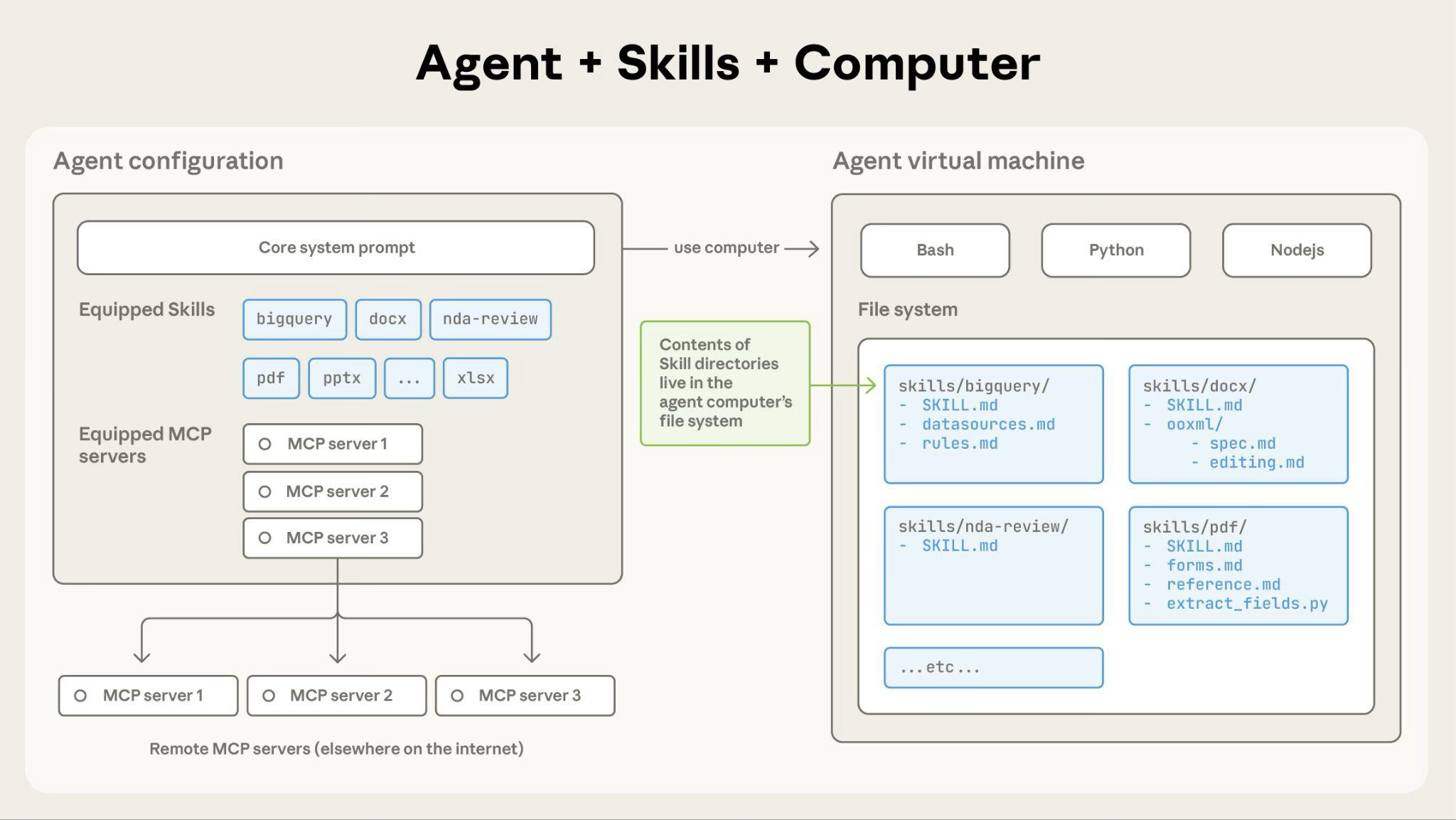
How Claude accesses Skill content:
When a Skill is triggered, Claude uses bash to read SKILL.md from the filesystem, bringing its instructions into the context window. If those instructions reference other files (like FORMS.md or a database schema), Claude reads those files too using additional bash commands. When instructions mention executable scripts, Claude runs them via bash and receives only the output (the script code itself never enters context).
What this architecture enables:
On-demand file access: Claude reads only the files needed for each specific task. A Skill can include dozens of reference files, but if your task only needs the sales schema, Claude loads just that one file. The rest remain on the filesystem consuming zero tokens.
Efficient script execution: When Claude runs validate_form.py, the script's code never loads into the context window. Only the script's output (like "Validation passed" or specific error messages) consumes tokens. This makes scripts far more efficient than having Claude generate equivalent code on the fly.
No practical limit on bundled content: Because files don't consume context until accessed, Skills can include comprehensive API documentation, large datasets, extensive examples, or any reference materials you need. There's no context penalty for bundled content that isn't used.
This filesystem-based model is what makes progressive disclosure work. Claude navigates your Skill like you'd reference specific sections of an onboarding guide, accessing exactly what each task requires.
Example: Loading a PDF processing skill
Here's how Claude loads and uses a PDF processing skill:
- Startup: System prompt includes:
PDF Processing - Extract text and tables from PDF files, fill forms, merge documents - User request: "Extract the text from this PDF and summarize it"
- Claude invokes:
bash: read pdf-skill/SKILL.md→ Instructions loaded into context - Claude determines: Form filling is not needed, so FORMS.md is not read
- Claude executes: Uses instructions from SKILL.md to complete the task
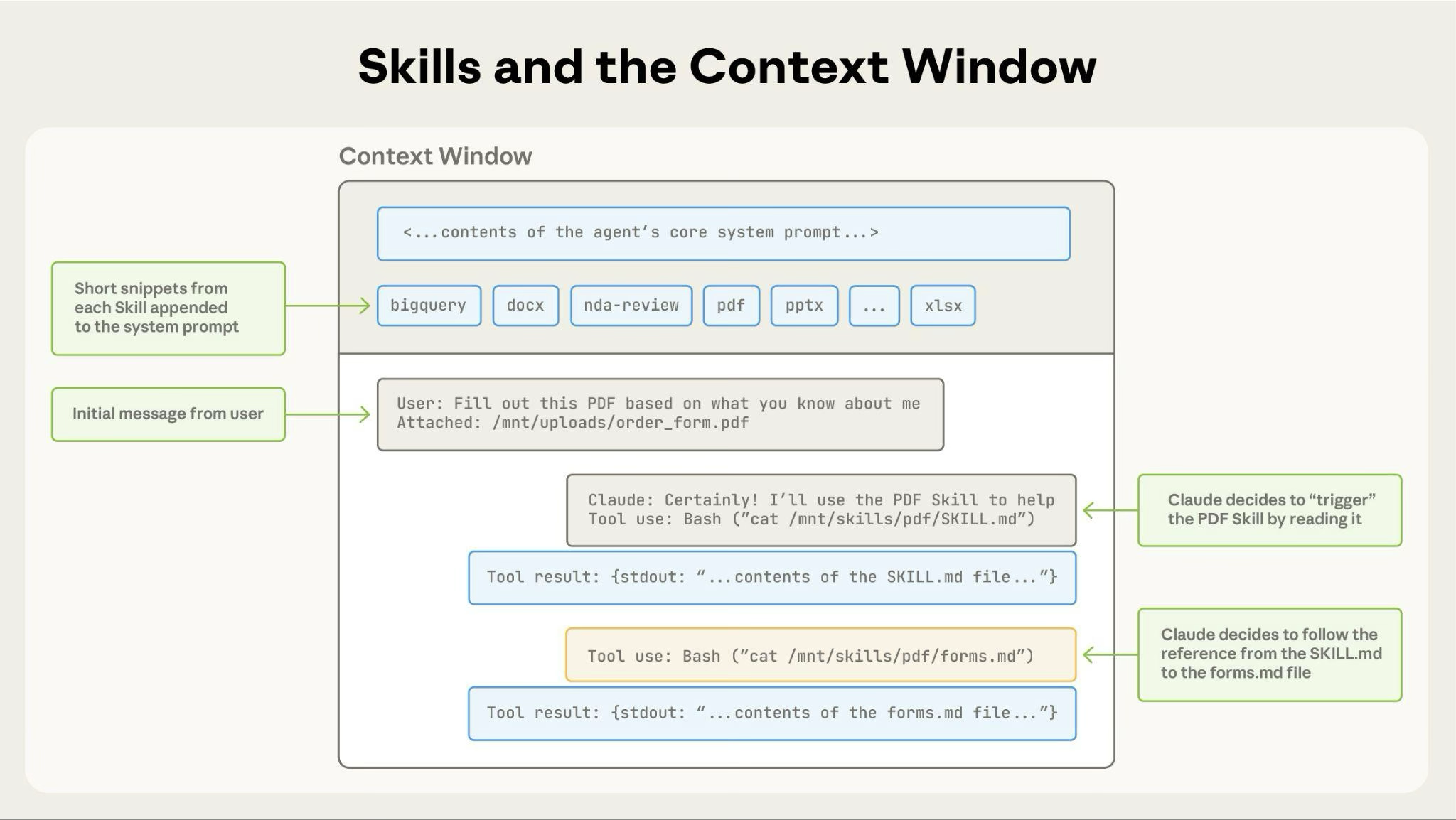
The diagram shows:
- Default state with system prompt and skill metadata pre-loaded
- Claude triggers the skill by reading SKILL.md via bash
- Claude optionally reads additional bundled files like FORMS.md as needed
- Claude proceeds with the task
This dynamic loading ensures only relevant skill content occupies the context window.
Skill structure
Every Skill requires a SKILL.md file with YAML frontmatter:
---
name: your-skill-name
description: Brief description of what this Skill does and when to use it
---

# Your Skill Name

## Instructions
[Clear, step-by-step guidance for Claude to follow]

## Examples
[Concrete examples of using this Skill]
Required fields: name and description
Field requirements:
name:
- Maximum 64 characters
- Must contain only lowercase letters, numbers, and hyphens
- Cannot contain XML tags
- Cannot contain reserved words: "anthropic", "claude"
description:
- Must be non-empty
- Maximum 1024 characters
- Cannot contain XML tags
The description should include both what the Skill does and when Claude should use it. For complete authoring guidance, see the best practices guide.
Limitations and constraints
Understanding these limitations helps you plan your Skills deployment effectively.
Cross-surface availability
Custom Skills do not sync across surfaces. Skills uploaded to one surface are not automatically available on others:
- Skills uploaded to Claude.ai must be separately uploaded to the API
- Skills uploaded via the API are not available on Claude.ai
- Claude Code Skills are filesystem-based and separate from both Claude.ai and API
You'll need to manage and upload Skills separately for each surface where you want to use them.
Sharing scope
Skills have different sharing models depending on where you use them:
- Claude.ai: Individual user only; each team member must upload separately
- Claude API: Workspace-wide; all workspace members can access uploaded Skills
- Claude Code: Personal (
~/.claude/skills/) or project-based (.claude/skills/); can also be shared via Claude Code Plugins
Claude.ai does not currently support centralized admin management or org-wide distribution of custom Skills.
Runtime environment constraints
The exact runtime environment available to your skill depends on the product surface where you use it.
- Claude.ai:
- Varying network access: Depending on user/admin settings, Skills may have full, partial, or no network access. For more details, see the Create and Edit Files support article.
- Claude API:
- No network access: Skills cannot make external API calls or access the internet
- No runtime package installation: Only pre-installed packages are available. You cannot install new packages during execution.
- Pre-configured dependencies only: Check the code execution tool documentation for the list of available packages
- Claude Code:
- Full network access: Skills have the same network access as any other program on the user's computer
- Global package installation discouraged: Skills should only install packages locally in order to avoid interfering with the user's computer
Plan your Skills to work within these constraints.