
35 lines
2.0 KiB
Markdown
35 lines
2.0 KiB
Markdown
---
|
|
|
|
slug: /dashboard-task
|
|
---
|
|
|
|
# Task management
|
|
|
|
The **Mission Center** page displays all tasks in the obshell Dashboard. This topic describes the information on the **Mission Center** page and the operations that you can perform.
|
|
|
|
You can access the **Mission Center** page by using the following two methods:
|
|
|
|
* Method 1: Log in to the obshell Dashboard console and click **Tasks** in the upper-right corner.
|
|
|
|
* Method 2: Log in to the obshell Dashboard console and click **System Management** > **Mission Center** in the left-side navigation pane.
|
|
|
|
You can filter tasks by status or search for a specific task. To view the details of a task, click the task name.
|
|
|
|

|
|
|
|
If a task is in the **In operation** state, you can click the task name to go to the task details page, and then click **Cancel Task** in the upper-right corner. After you confirm the operation, the task is canceled.
|
|
|
|
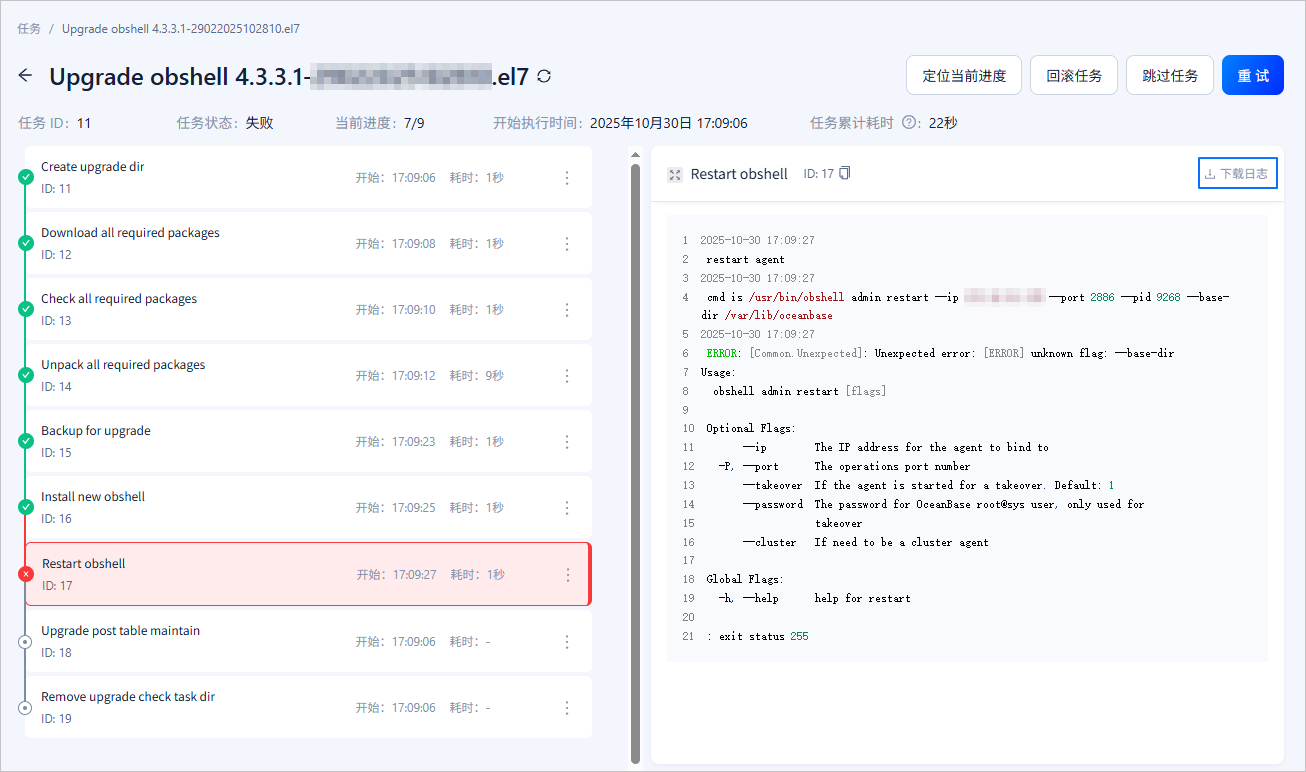
If a task is in the **Failed** state, you can perform the following operations:
|
|
|
|
* Click **Locate Current Progress**. The page jumps to the failed subtask page. You can troubleshoot the issue based on the log information displayed on the right side of the task details page.
|
|
|
|
* Click **Rollback Task**. In the confirmation window, click **Rollback**. The rollback operation rolls back all executed tasks from the point of failure.
|
|
|
|
* Click **Skip Task**. In the confirmation window, click **Skip**. The skip operation skips the entire task.
|
|
|
|
* Click **Retry**. In the confirmation window, click **Confirm**. The retry operation retries all failed nodes and continues execution from the failed node.
|
|
|
|
* Click **Download log** in the upper-right corner of the log details page. Download the current log file and post it to the [Q&A section](https://open.oceanbase.com/) on the official website. Our on-duty engineers will assist you in troubleshooting the issue.
|
|
|
|
<!--  -->
|