
28 lines
2.5 KiB
Markdown
28 lines
2.5 KiB
Markdown
---
|
|
|
|
slug: /dashboard-package
|
|
---
|
|
|
|
# Package management
|
|
|
|
Log in to the obshell Dashboard console and choose **System Management** > **Software package management** in the left-side navigation pane to go to the **Software package** page. This topic describes how to view or upload software packages in the obshell Dashboard.
|
|
|
|
## View package details
|
|
|
|
On the package page, the software package name, version, hardware architecture, size (MB), MD5 value, upload time, and available operations of the software package uploaded to the obshell Dashboard are displayed. Hover the pointer over the MD5 column in the corresponding row to view the software package's MD5 value.
|
|
|
|
You can use the <span style={{ verticalAlign: 'middle' }}><img src="https://obbusiness-private.oss-cn-shanghai.aliyuncs.com/doc/img/observer-enterprise/V4.3.5/700.reference/1500.Components-and-Tools/100.obshell/500.icon/100.ob-dashboard-tenant-02.png" alt="filter" style={{ height: '20px' }}/></span> icon in **Version** and **Hardware Architecture** to filter and view packages by version and hardware architecture. You can also use the <span style={{ verticalAlign: 'middle' }}><img src="https://obbusiness-private.oss-cn-shanghai.aliyuncs.com/doc/img/observer-enterprise/V4.3.5/700.reference/1500.Components-and-Tools/100.obshell/500.icon/100.ob-dashboard-tenant-03.png" alt="sort" style={{ height: '20px' }}/></span> icon in **Package Name** and **Upload time** to select whether to sort the packages in ascending or descending order. You can also use the search box in the upper right corner to search for a specific package if too many packages are uploaded.
|
|
|
|

|
|
|
|
## Upload software packages
|
|
|
|
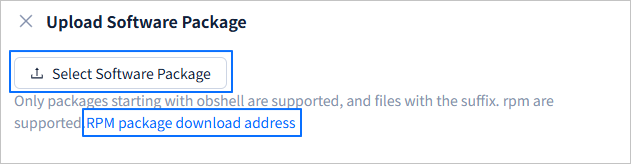
Click **Upload Software Package** in the upper-right corner of the **Software package** page, and click **Select Software Package** to upload an RPM package from the local server. Before you upload an RPM package, make sure that one meets the specified requirements on the local server. If no required RPM package is found on the local server, you can click the **RPM package download address** field to obtain it from the open source mirror.
|
|
|
|
|
|
|
|
## Uninstall a package
|
|
|
|
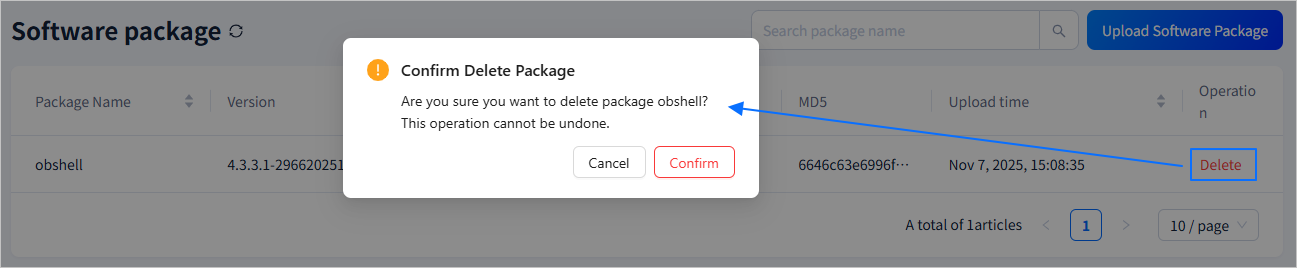
Click **Delete** in the **Operation** column of the corresponding package, and then click **Confirm** in the message that appears.
|
|
|
|
 |