
16 lines
1.1 KiB
Markdown
16 lines
1.1 KiB
Markdown
---
|
|
|
|
slug: /dashboard-parameter
|
|
---
|
|
|
|
# Parameter management
|
|
|
|
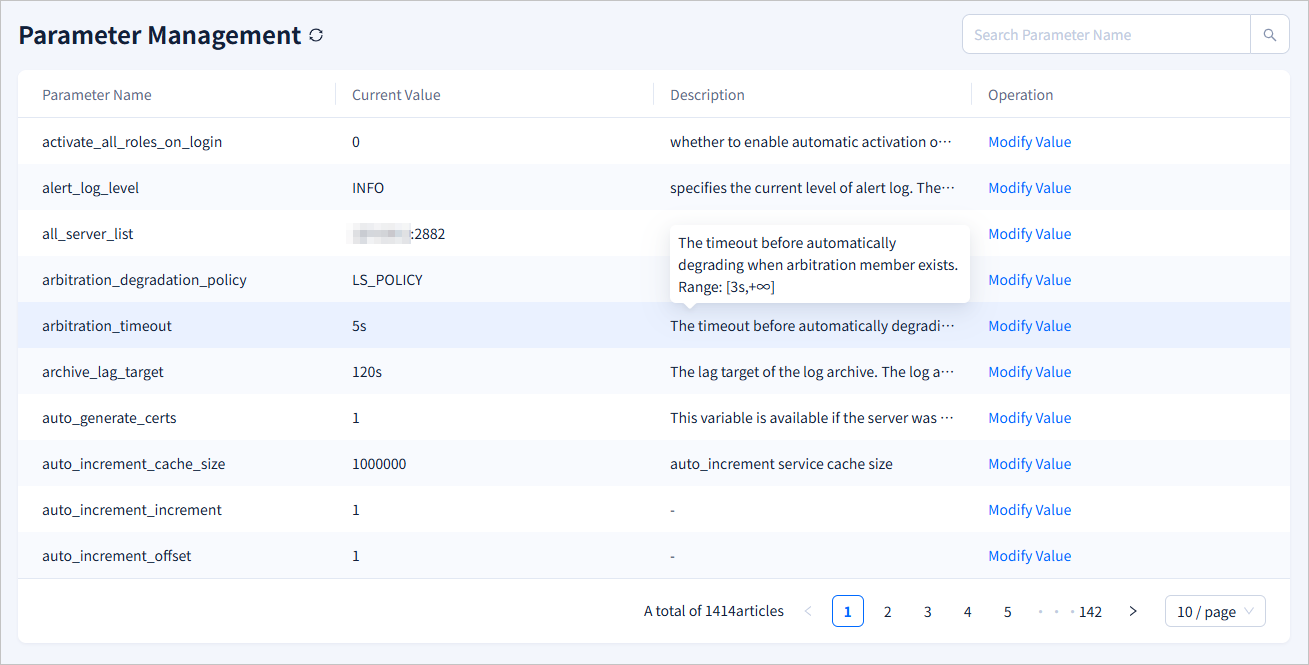
Log in to the obshell Dashboard console and click **Parameter Management** in the left-side navigation pane to go to the **Parameter Management** page. This topic describes how to view and modify parameters of a seekdb instance by using obshell Dashboard.
|
|
|
|
The **Parameter Management** page displays the **Parameter Name**, **Current Value**, and **Description** of the parameters in seekdb, and the operations that you can perform on the parameters. You can move the pointer over the **Description** column of a parameter to view the description of the parameter. You can also search for a parameter in the search box in the upper-right corner of the page.
|
|
|
|
|
|
|
|
You can click **Modify Value** in the **Operation** column to modify the value of a parameter. After you modify the value, click **Submission** and confirm the modification.
|
|
|
|
 |